
Setup Instructions
Follow these steps to get FishBot running. Most users are set up in under 5 minutes.
Download & Install FishBot
Download the latest version from our website and run the installer. Follow the setup wizard to complete installation.
Configure WoW Window
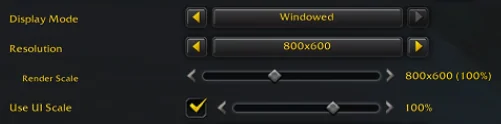
Set World of Warcraft to Windowed mode with resolution 800x600 and UI Scale at 100%. Particle Density must be set to Fair or above. This exact resolution is required for FishBot to work correctly.
Disable HDR
In WoW's graphics settings, make sure HDR is turned off. HDR can alter screen colors and interfere with bobber detection.
Disable Hardware Cursor
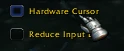
In WoW's graphics settings, turn off Hardware Cursor. You will find it in the same panel as the HDR option.
Set Monitor Scale to 100%
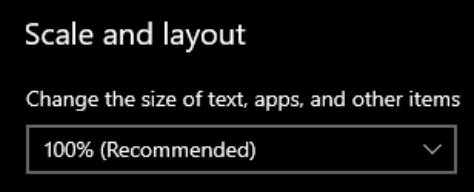
In your Windows display settings, ensure the scale factor is set to 100%. Other scale values will cause detection issues.
Bind Fishing Key
In WoW, bind your fishing skill to the "Z" key. This is required for FishBot to cast your fishing line automatically.

Bind Bait KeyOptional
If you want FishBot to automatically apply bait, bind your bait ability to "Shift + Z" in WoW. Then enable the bait option in FishBot. The bot will reapply bait at your chosen interval.

Disable Click to Move
Disable the click-to-move option in your WoW client. This prevents accidental movement when FishBot clicks to catch fish.
Block Guild Invites
Disable guild invites in your WoW social settings. This avoids popups that can interrupt the bot.
Disable AutolootOptional
If you want the blacklist feature to work, disable autoloot in your WoW interface settings. This lets FishBot selectively loot only the items you want.
Disable "Open Loot Window at Mouse"Optional
For the blacklist feature to work, disable the "Open Loot Window at Mouse" option in your WoW interface settings. The loot window must appear in its default location for FishBot to read it.
Reduce Weather DensityOptional
Type /console WeatherDensity 0 in WoW chat to remove rain and snow effects. Weather particles can interfere with bobber detection.
Position Your Character
Move your character to a fishing spot with water in front of you. Ensure your character is facing the water and within fishing range. Zoom your camera in to first person.
Launch FishBot
Ensure WoW is running, then open FishBot and click "Start". The bot will begin detecting fishing opportunities and automating the fishing process.
Important Notes
- • Ensure WoW is running before starting FishBot
- • Take regular breaks to avoid suspicion
- • Monitor the bot periodically to ensure it's working correctly

Still Having Issues?
Try our Graphics Setter addon, it automatically configures your WoW graphics settings to work perfectly with FishBot.
Download Graphics Setter AddonInstallation
- Extract the
GraphicsSetterfolder into your WoW AddOns directory:...\Interface\AddOns\GraphicsSetter - On the character select screen, click AddOns and check "Load out of date AddOns".
- In-game, type
/gsto apply the optimized graphics preset.
Use /gs help to see all commands, or /gs reset to restore your previous settings.